


 This is a nested chat re-implementation of
OptiGuide, which is an
LLM-based supply chain optimization framework.
In addition to AG2, this notebook also requires eventlet and Gurobipy.
The eventlet package is used in this notebook to constrain code
execution with a timeout, and the gurobipy package is a mathematical
optimization software library for solving mixed-integer linear and
quadratic optimization problems.
This is a nested chat re-implementation of
OptiGuide, which is an
LLM-based supply chain optimization framework.
In addition to AG2, this notebook also requires eventlet and Gurobipy.
The eventlet package is used in this notebook to constrain code
execution with a timeout, and the gurobipy package is a mathematical
optimization software library for solving mixed-integer linear and
quadratic optimization problems.
Some extra dependencies are needed for this notebook, which can be installed via pip:For more information, please refer to the installation guide.
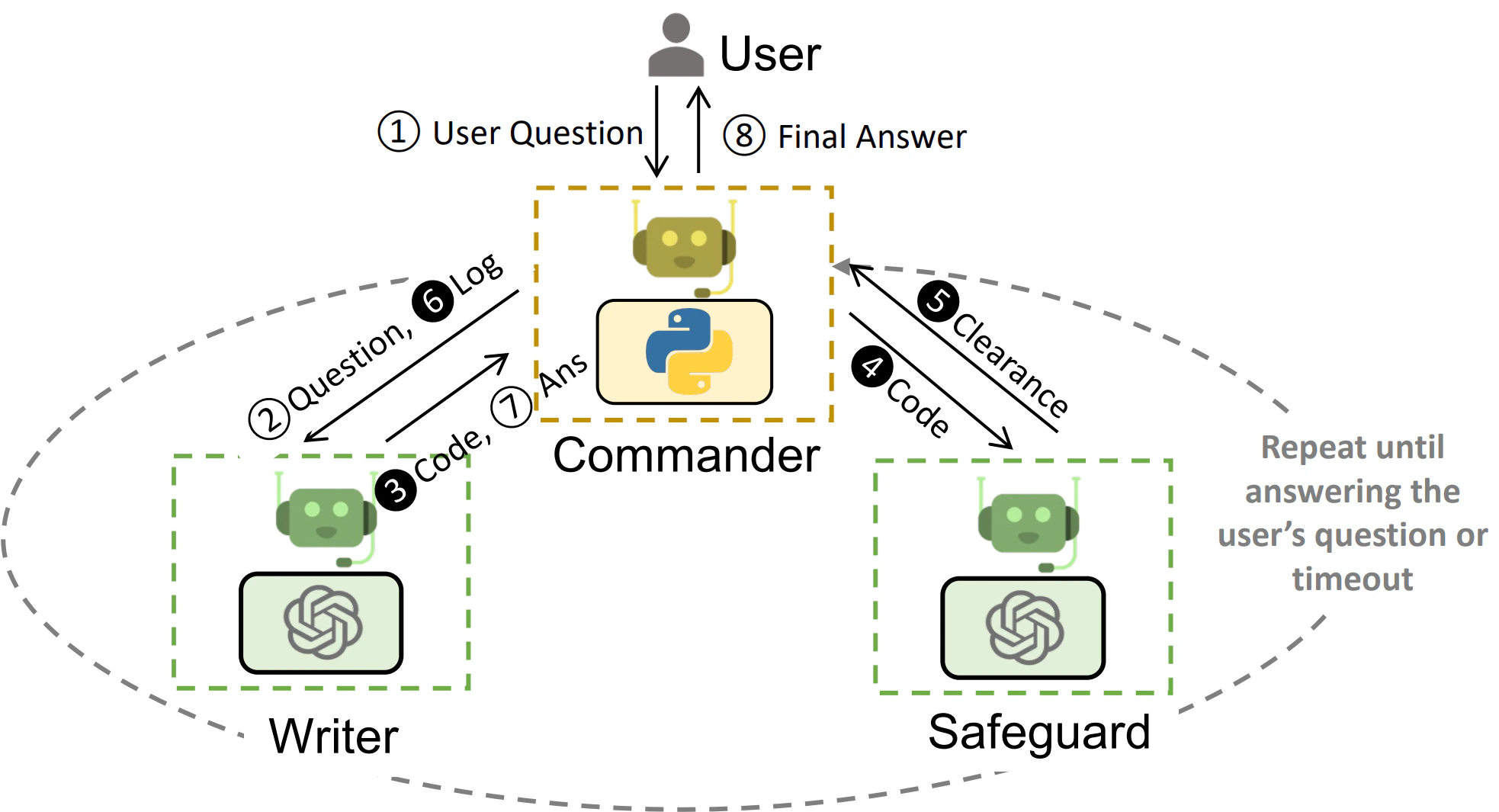
Intended agent orchestration in OptiGuide.
Step 0. Prepare Helper Functions
The code cell below includes several helper functions to be used by agents. The helper functions are adopted directly from OptiGuide.Utility Functions
Several utility functions (replace, insert_code, run_with_exec) are defined to manipulate and execute the source code dynamically:-
replace(src_code, old_code, new_code) -> str:
Replaces a specified block of code within the source code with new code. This is essential for updating the code dynamically based on chatbot and user interactions. -
insert_code(src_code, new_lines) -> str:
Determines where to insert new lines of code based on specific markers in the source code. It’s used to seamlessly integrate generated code snippets. -
run_with_exec(src_code) -> Union[str,
Exception]:
Executes the modified source code within a controlled environment, capturing and returning the output or any errors that occur. This function is crucial for testing the feasibility and correctness of the generated code solutions.
Functions External Code Retrieval
The cell also includes logic to retrieve example source code from a remote repository using the requests library. This example code serves as a base for the chatbot to work with, allowing users to see real-life applications of the concepts discussed. The retrieved code is then displayed, showing both the beginning and the end of the source code to give a glimpse of its structure and content.Step 1. Agent Construction
This cell introduces the Writer and OptiGuide agent classes and their instances to manage the interaction between the user, the chatbot, and the optimization solver. This streamlines the process of generating, evaluating, and integrating code solutions for supply chain optimization problems.Classes Defined
-
OptiGuide: Inherits fromautogen.AssistantAgentand serves as the main class for handling the supply chain optimization logic. It maintains state information like the source code, debugging attempts left, success status, and user chat history. Key methods includeset_successandupdate_debug_times, which are used to update the agent’s state based on the outcomes of interactions. -
Writer: Also inherits fromautogen.AssistantAgent, this class is tailored to manage the generation and explanation of Python code solutions. It keeps track of the source code and example Q&A to assist in generating responses to user queries.
Agent Instances
-
writer,safeguard, andoptiguide_commander: Instances of the classes defined above, each configured with specific roles in the code generation and evaluation process. These agents work together to ensure that the user’s questions are answered with safe, optimized, and understandable Python code solutions. -
user: An instance ofautogen.UserProxyAgent, representing the end-user interacting with the notebook. It’s configured to simulate user inputs and responses, facilitating an interactive and engaging learning experience.
Agent System Messages
Each agent is associated with a corresponding system message. Those system messages are adopted directly from OptiGuide.Step 2. Orchestrate Nested Chats
These three agent instances are orchestrated in the following way with thewriter and safeguard nested into the commander agent as the
inner monologue.
This next cell defines critical functions that manage the interactions
between the OptiGuide system, the user, and the internal logic for
processing and responding to queries. Each function plays a specific
role in guiding the conversation, handling code generation requests,
ensuring code safety, and summarizing outcomes. This ensures that agents
receive clear instructions, immediate feedback, and a secure environment
for exploring supply chain optimization problems through code.
Information about the sequence of chats can be specified in the
chat_queue argument of the register_nested_chats function. The
following fields are especially useful: - recipient (required)
specifies the nested agent; - message specifies what message to send
to the nested recipient agent. In a sequence of nested chats, if the
message field is not specified, we will use the last message the
registering agent received as the initial message in the first chat and
will skip any subsequent chat in the queue that does not have the
message field. You can either provide a string or define a callable
that returns a string. - summary_method decides what to get out of the
nested chat. You can either select from existing options including
“last_msg” and “reflection_with_llm”, or or define your own way on what
to get from the nested chat with a Callable. - max_turns determines
how many turns of conversation to have between the concerned agent
pairs.